> ## Documentation Index
> Fetch the complete documentation index at: https://docs.mcpblacksmith.com/llms.txt
> Use this file to discover all available pages before exploring further.
# Validation
> Validate your OpenAPI specification before generation to uncover structural issues and improve server quality.
## Overview
MCP Blacksmith validates your specification at two stages:
1. **On upload** — structural issues and required metadata are checked automatically using [openapi-spec-validator](https://github.com/python-openapi/openapi-spec-validator). This validation always runs and blocks further steps if the specification is malformed. See [Specification Upload](/generation/spec-upload) for details.
2. **Pre-generation** — the specification is syntactically validated against the OpenAPI standard. If the specification is found to be malformed, generation is blocked and errors are reported in the console.
In addition, you can run an **optional validation pass** from the Validation tab, powered by [vacuum](https://quobix.com/vacuum/), to uncover deeper issues — security pattern problems, quality gaps, and best practice violations. Fixing these issues upstream in the specification directly improves the quality of the generated server.
## How to validate
In the [dashboard](https://mcpblacksmith.com/dashboard):
1. [Upload your specification](/generation/spec-upload)
2. Navigate to the **Validation** tab
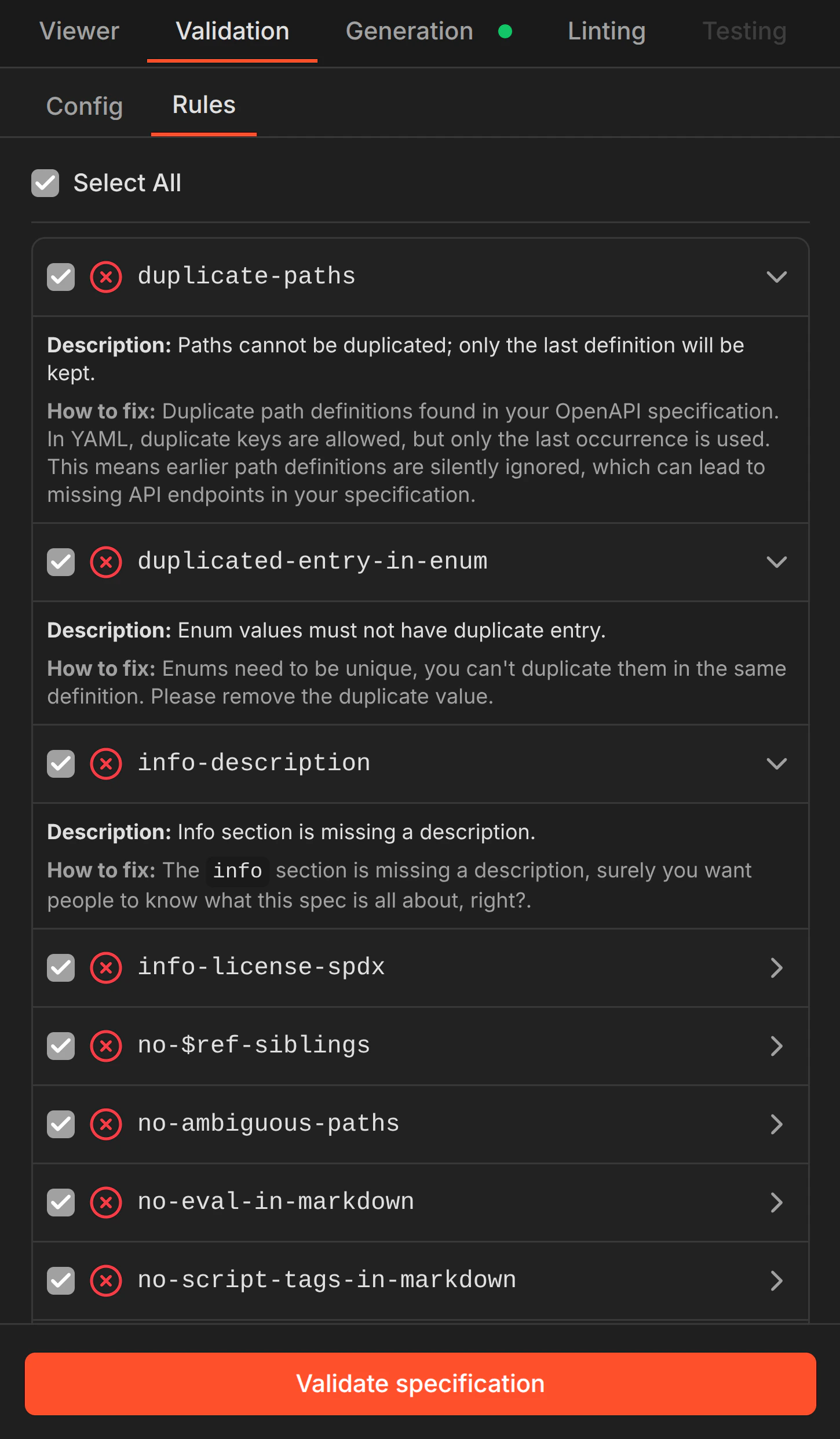
3. Select the validation rules you want to run (or use **Select All**)
4. Click **Validate specification**
 Results are viewable by clicking **View issues in Viewer** or by navigating directly to the **Viewer** tab and opening the **Problems** panel. Issues are clickable and navigate to the exact location in your specification.
The Viewer currently supports viewing only. Editing specifications directly within the dashboard will be available in a future release.
## What it checks
Validation rules cover structural correctness, security patterns, and specification quality:
* **Structural issues** — duplicate paths, broken `$ref` references, ambiguous path definitions, missing required fields
* **Security concerns** — missing API description, `$ref` sibling conflicts, eval-in-markdown, script tags in markdown
* **Quality improvements** — missing operation descriptions, duplicate enum entries, license identifiers, naming conventions
Each rule includes a description and a **how to fix** guide explaining the issue and how to resolve it in your specification.
## Why it matters
A better specification produces a better server. Validation helps you:
* Discover errors that could affect security patterns and generated code quality
* Identify missing descriptions that result in undocumented tools
* Catch duplicate or ambiguous paths that lead to silent overwrites
* Surface broken references before they become runtime errors
Improve your specification and you improve the generated MCP server — validation is the fastest way to find what needs attention.
Results are viewable by clicking **View issues in Viewer** or by navigating directly to the **Viewer** tab and opening the **Problems** panel. Issues are clickable and navigate to the exact location in your specification.
The Viewer currently supports viewing only. Editing specifications directly within the dashboard will be available in a future release.
## What it checks
Validation rules cover structural correctness, security patterns, and specification quality:
* **Structural issues** — duplicate paths, broken `$ref` references, ambiguous path definitions, missing required fields
* **Security concerns** — missing API description, `$ref` sibling conflicts, eval-in-markdown, script tags in markdown
* **Quality improvements** — missing operation descriptions, duplicate enum entries, license identifiers, naming conventions
Each rule includes a description and a **how to fix** guide explaining the issue and how to resolve it in your specification.
## Why it matters
A better specification produces a better server. Validation helps you:
* Discover errors that could affect security patterns and generated code quality
* Identify missing descriptions that result in undocumented tools
* Catch duplicate or ambiguous paths that lead to silent overwrites
* Surface broken references before they become runtime errors
Improve your specification and you improve the generated MCP server — validation is the fastest way to find what needs attention.